AI-Powered CRM Automation: The Six-Layer CRM Operating System
A scenario-based CRM operating system that replaced manual analyst handoffs, gave operators direct targeting, and closed the loop from data to activation.
A CRM team filed a Monday-morning request for a same-day re-engagement audience: subscribers who had started but not finished a tentpole series, segmented by region, ahead of a finale promotion that needed to ship by afternoon. The request was structurally the same query the team had filed a dozen times that month under different titles. The analyst quoted three days. By the time the audience was built, the finale promotion had already run; the eligible subscribers had either churned through the window or watched the finale anyway. The campaign was a post-mortem before it shipped.
That kind of miss is the shape of reactive CRM operations. Every campaign starts as a ticket. Every ticket is structurally the same as one the team filed last month under a different title. Every audience has to be rebuilt from scratch because nothing about the previous build is reusable. Most data teams accept this as a fact of life and add capacity. The compounding move is to delete the loop.
A CRM team is either configuring scenarios or filing tickets. Once it starts filing tickets, every campaign is a negotiation; once it starts configuring scenarios, the data team gets to build infrastructure instead. The way you get there is not a self-service UI in front of the warehouse. It is a structured operating system that encodes business logic into reusable, composable rules and ships activation as a first-class output.
Why this matters now
Industry-wide, the same pattern shows up. Customer-engagement platforms have spent the last few years moving toward composable audience builders, but most teams’ actual workflows still depend on analyst-built CSV uploads. The gap is not the activation tool. The gap is the operating system above it that translates the data foundation into reusable scenarios.
MENA streaming runs a sharper version of the same problem. Release calendars compress launches into dense windows, household structure means a single account hides multiple viewers with divergent preferences, and CRM cadence is high enough that manual analyst handoff is structurally incompatible with how campaigns actually ship. Either the data team owns the bottleneck and the CRM team waits, or the CRM team owns the bottleneck and the data team shrinks to an audience-building service.
The fix that worked was a six-layer architecture. Each layer is independent. Skipping a layer collapses the next one.
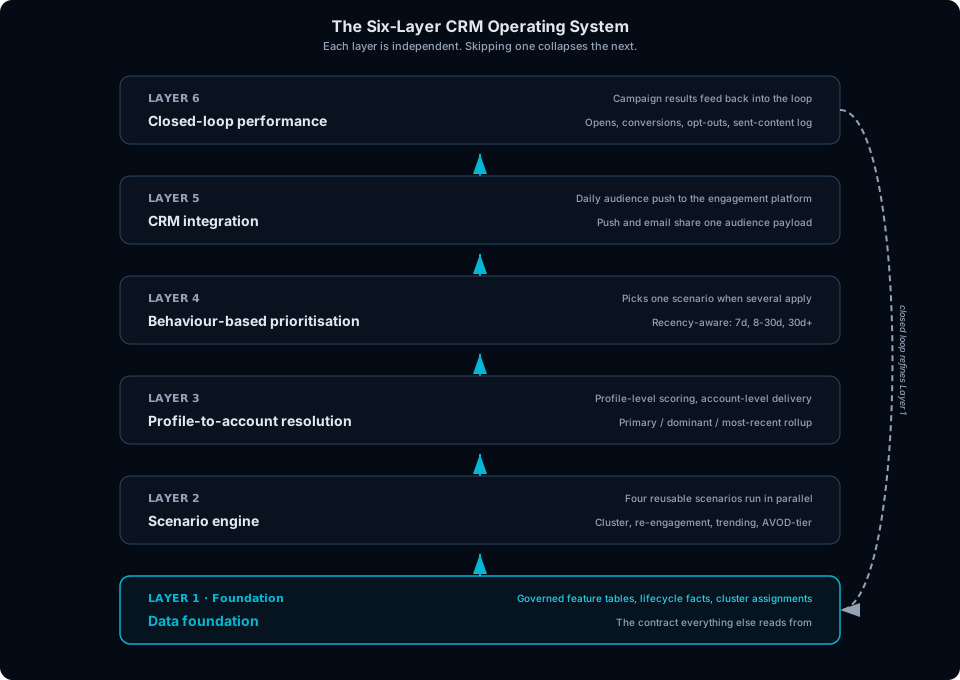
Each layer earns the right to the next. Layer 6 closes the loop by feeding campaign results back to refine the Layer 1 features.
The Six-Layer CRM Operating System
Layer 1: Data foundation
What it is. The governed feature tables the rest of the system reads from. Subscriber tenure, churn risk, content preferences, engagement cohorts, cluster assignments from prior viewing-behaviour work, recent activity signals, and subscription lifecycle movement (new, churned, reactivated, upgraded). The scenario engine consumes them; the BI and ML workflows that produce them own them.
Why it matters. This layer decides whether the rest of the system is cheap or expensive. A CRM stack built without a real feature foundation ends up reverse-engineering one inside the CRM tool: SQL pasted into segment builders, derived fields computed at audience-build time, cohort logic that drifts between campaigns because there is no canonical definition. By the time that has happened, the team has two feature stores, and the one inside the CRM tool is the one nobody trusts.
What goes wrong without it. Every scenario becomes a fresh analyst query against raw warehouse tables. The same subscriber-state logic gets rebuilt in five places, drifts between rebuilds, and produces inconsistent audiences across campaigns that are supposedly running the same logic. The scenario engine collapses into the ticket-driven workflow it was supposed to replace, because the layer above has no clean foundation to stand on.
Layer 2: Scenario engine
What it is. The reusable rules that turn feature data into campaign audiences. Each scenario is a template, parameterised at runtime, that selects a candidate subscriber pool and ranks the content to recommend to it. Four scenarios run in parallel:
- Cluster-based discovery. Recommends popular shows among subscribers in the same behaviour cluster, matched by viewing cluster, predicted gender, and region. Collaborative filtering with explicit cluster boundaries.
- Re-engagement. Reaches subscribers who started a series but did not finish: profiles that watched more than two episodes with episodes remaining, within a configurable recency window.
- Trending discovery. Surfaces content climbing in regional popularity week-over-week. Targets the “what is everyone watching right now” impulse by highlighting titles that moved up in rank but are not yet in the top five.
- AVOD-tier. Promotes the most popular ad-supported content per region for non-paying users, ranked by unique viewers with meaningful watch time.
Each scenario applies the same runtime filters: deduplication against a multi-week sent-content window, content guards (kids, sports, inactive catalog excluded), eligibility checks (only adult, active profiles processed).
Why it matters. Scenarios are configuration, not code. The CRM team adjusts the parameters (recency window, engagement threshold, candidate pool size) without writing SQL. A new campaign against an existing scenario is a configuration change; a new scenario template is rare data-team work. The unit of work the CRM team owns is “tune a scenario for this week’s calendar”; the unit of work the data team owns is “add a scenario template when a structurally new behaviour shows up.”
What goes wrong without it. Every campaign becomes a one-off query. The deduplication and eligibility rules drift across campaigns because each query carries its own copy of them. The CRM team is technically self-serving against the warehouse but is still filing tickets in disguise, because every “small change” requires SQL and the analyst is back in the loop.
Layer 3: Profile-to-account resolution
What it is. The mapping from per-profile recommendations to the account-level audience the engagement platform actually sends to. Scenarios produce a recommendation per profile (because viewing behaviour is a profile-level signal), but the engagement platform targets households (because push notifications and emails route to the account, not the viewer). The mapping is configurable: default is the primary profile (highest watch hours), but it can be switched to most-recent-activity or dominant-profile depending on campaign goal.
Why it matters. Multi-profile households are not an edge case in this market, they are the default. A single subscription routinely hosts several viewers with divergent preferences, often spanning genres and content ratings. Averaging profiles into one account-level signal flattens the very behaviour the scenarios were designed to read. Profile-level processing with account-level delivery is what keeps the recommendation defensible; in single-viewer markets the gap is smaller and the layer is overkill.
What goes wrong without it. The system either targets the account directly (and recommends the kids-profile preferences to the account holder, or the account holder’s preferences to a profile that has never watched that genre), or it sends one notification per profile (and the household receives three pushes in five minutes). Both failure modes show up immediately in opt-out rates, and once a subscriber opts out of CRM channels they are out of reach for every future campaign, not just this one.
Layer 4: Behaviour-based prioritisation
What it is. The rule that picks one scenario when an account is eligible for several. The default mode is recency-aware:
- Subscribers active in the last 7 days get the re-engagement scenario, because re-engagement works when the habit is fresh.
- Subscribers active 8 to 30 days ago get the trending-discovery scenario, because trending content reignites interest faster than discovery.
- Subscribers inactive for more than 30 days get the cluster-based discovery scenario, because by then the only credible recommendation is “people like you are watching this.”
- Non-paying users always get the AVOD-tier scenario, because the others would push content they cannot watch.
Why it matters. Prioritisation is not the same problem as targeting. A scenario decides who is eligible; prioritisation decides which eligibility wins when several apply. Building the targeting logic first and the prioritisation logic later (or worse, leaving it to a fixed rotation) is the version of this system most teams ship, and it is the version that produces the “the recommendations are technically correct but feel random” complaint from the CRM team.
What goes wrong without it. The same subscriber receives a re-engagement nudge one week, a discovery push the next, and a trending alert the week after, in a rotation set by which scenario happened to run first. The system has scenarios but no editorial voice. Engagement rates flatten because the message-to-state match keeps getting worse, and the team blames the scenarios when the actual broken layer is the prioritiser.
Layer 5: CRM integration
What it is. The delivery contract between the scenario engine and the customer-engagement platform. Audience pushes go via API on schedule. Push and email channels share the same audience payload, so a single scenario run can feed both channels without rebuilding the audience. A temporal configuration system handles seasonal overrides (predictable recurring windows where content priorities shift, regional priority lists) with auto-activation dates, requiring no code changes for routine seasonal shifts.
Why it matters. The schedule of the integration is the design decision, not the integration itself. Pushing once a day and letting the engagement platform handle send-time optimisation is the right default; pushing in real time on every event is the wrong default, and most teams that wire this layer up wire it up wrongly the first time. The CRM team does not need a live event stream, they need a daily audience snapshot that the engagement platform sends out within its own optimal-time window.
What goes wrong without it. Scenarios run but their outputs sit in a warehouse table that nobody reads. The CRM team exports the table to CSV and uploads it to the engagement platform manually, which means the activation step still has a human in it, which means the layer above the human is doing self-service on paper only.
Layer 6: Closed-loop performance
What it is. Campaign results flowing back from the customer-engagement platform into the analytics layer. Opens, click-throughs, conversions, opt-outs, and the sent-content log that feeds the multi-week deduplication window inside the scenario engine.
Why it matters. The loop is the thing that makes the system compound. Without it, every scenario runs against a fresh audience that has no memory of what was sent last week, deduplication is approximate at best, and the team has no way to compare configurations of the same scenario against each other. With it, the team can run A/B tests on scenario parameters (recency window, engagement threshold, ranking weights), pick the winning configuration, and retire the losing one. The scenarios that started as templates start improving as data.
What goes wrong without it. This is the layer most teams skip, and the failure mode is silent. The scenarios still run, the CRM team still configures them, the campaigns still ship, but there is no way to know which configurations are working. Deduplication degrades into “we think we did not send this last month.” The CRM operating system stops being an operating system and becomes a publishing pipeline that happens to be configurable.
Parameter design: every recurring ask is a knob
The single design decision that decides whether the system is self-serving or ticket-serving is which parameters the scenarios expose. A parameter the CRM team can tune is a campaign they can launch without the data team; a parameter that is hard-coded is a future ticket waiting to be filed.
The right starting set is small and operational. Recency window (how far back to look for an engagement signal). Engagement threshold (how many episodes, minutes, or sessions count). Candidate pool size (how many subscribers to push to before ranking). Sort weight (whether to prioritise newest, most popular, or cluster-similar within the candidate pool). Output cap (how many recommendations per profile).
The wrong starting set is everything else. Exposing the cohort definition itself, the feature table the scenario reads from, or the ranking algorithm, turns the scenarios into a query builder and pushes the CRM team back into SQL territory. The art is choosing the four or five knobs that cover most of the recurring asks, and resisting pressure to expose more.
The vocabulary check is simple. Every time the CRM team files a request, ask whether it could have been a parameter. If yes, the scenario design missed a knob. If no, the request was a new scenario template, and the data team owns it.
Where I would start
The six layers are the end state. The way to actually arrive at them is incremental, and the order is dictated by trust, not by a roadmap.
The first deliverable is Layer 1 alone: a governed feature foundation the CRM team can already see existing dashboards reading from. Not a new scenario, not a new audience, not a new push. Just the canonical definition of subscriber tenure, activity recency, and lifecycle state, with a query interface anyone on the analytics team can inspect. The reason this comes first is that the CRM team has to trust the feature definitions before they will trust any scenario built on top of them, and the fastest way to earn that trust is to point at the same numbers their existing reports already show, derived from the same tables.
The second deliverable is Layer 6 (the closed loop), before any scenario ships. This is the order most teams get wrong. The instinct is to build a scenario first, ship a campaign, then measure. The result is that the first three campaigns ship with no comparable measurement, the team cannot tell whether they worked, and the whole system has to be retrofitted with tracking that should have been there from the start. Wire the engagement-platform feedback into the analytics layer before the first scenario goes live. The first scenario’s first campaign is then its own first A/B test.
The third deliverable is the re-engagement scenario, end-to-end. It is the right first scenario for three reasons the others do not share: it has the highest CRM team demand (re-engagement is the most frequent campaign request), the simplest filter logic (one feature: started but did not finish), and the cleanest evaluation criteria (did the subscriber come back and finish, yes or no). End-to-end means it touches every other layer: account-resolution from Layer 3, scenario logic from Layer 2, integration from Layer 5. Shipping it proves the system works without needing the CRM team to choose between scenarios yet, which keeps Layer 4 out of the critical path.
The fourth deliverable is Layer 4 (prioritisation), once two more scenarios are live. The reason it waits is that prioritisation only matters when there is something to prioritise between. Building it on day one means writing rules against scenarios that do not yet exist; building it once three scenarios are running means the rules can be written against actual conflicts the team has already seen.
Everything from there is configuration. New campaigns are parameter tweaks on existing scenarios; new scenarios are added on the rare occasions when a structurally new behaviour shows up. The CRM team starts configuring instead of filing tickets, because the layer above them has earned the right to be infrastructure.
One MENA-flavored note
The MENA streaming calendar has shapes that punish a CRM stack built on Western defaults. Ramadan is the densest CRM window of the year: catalog re-orders toward Arabic series and films that have been waiting on the release schedule, viewing patterns invert toward late-night, and the push cadence rides a 30-day rhythm where every day past launch reduces the chance the household catches up. Eid that follows is finale-heavy and short; end-of-year holiday viewing is the third dense window. Two architectural choices fall out of this rhythm. The seasonal-override layer is the reason the system can absorb Ramadan without an emergency code deploy. And the multi-profile household shape compounds inside Ramadan: when content priorities shift toward Arabic series, the kids-profile and the parent-profile diverge harder than they do in a normal week, and account-level averaging fails more loudly. Profile-level processing with account-level rollup is defensible year-round; in Ramadan it is the difference between a campaign that lands and a campaign the household ignores.
Closing
Is your CRM team configuring scenarios or filing tickets?
When the answer is filing tickets, every campaign pays its cost twice: once upfront in analyst time, once again on the back end in campaign delay. The audience that ships is always for last week’s calendar. When the answer is configuring scenarios, the data team builds the operating system once and the CRM team operates it continuously, with the loop tightening every week as the feedback returns and the parameters get refined against real outcomes. The six-layer system above is the change that switches the answer. The way to get there is to ship the foundation and the loop first, let the team launch the first scenario against them, and add scenarios one at a time until parameters cover most of the recurring asks.